
Scope note: This article summarizes publicly available data and aggregated user experiences. It does not provide repair advice, guarantee performance, or imply device malfunction. Individual results may vary.
Introduction
Headphone battery drain trends are widely reported across wireless headphones and earbuds. Aggregated user reports, manufacturer documentation, independent testing, and forum discussions reveal patterns that repeat across brands and models. This article highlights these trends to help readers understand observed behavior, not to prescribe solutions.
Table of Contents
Section 1 — Commonly Reported Causes of Rapid Battery Drain
The following battery drain patterns are consistently reported across brands and product types:
1. Feature-Dependent Consumption
Users commonly report that enabling ANC, spatial audio, or high-volume playback correlates with faster battery depletion.
2. Bluetooth Instability
Support forums frequently mention that devices experiencing frequent reconnections or signal drops show higher observed drain rates.
3. Firmware Reporting Inconsistencies
Manufacturer documentation notes that older firmware versions sometimes misreport battery percentage, leading to perceived rapid drain.
4. Audio Type and Volume Level
Independent testing observed that high-volume audio and certain codecs or streaming formats can increase power consumption.
5. Environmental Conditions
Users report that extreme temperatures, both hot and cold, correlate with faster observed battery depletion.
SECTION 1.5 — Where Battery Drain Is Structurally Limited
Across manufacturer documentation, independent testing, and forum reports, battery performance is inherently constrained by:
- Maximum cell capacity and chemistry
- High current draw during simultaneous feature usage
- Environmental factors (temperature, humidity)
- Long-term degradation from repeated charge cycles
These limitations are consistent across brands and models and cannot be fully mitigated through user behavior.
Section 2 — Commonly Reported Workarounds
The following behaviors are frequently reported by users and documented in support resources, without implying guaranteed results:
1. Adjusting Feature Usage
Many users report that reducing ANC, spatial audio, or high-volume listening can stabilize observed battery performance.
2. Maintaining Regular Charging Practices
Support documentation suggests fully charging before extended sessions is commonly observed among users tracking battery trends.
3. Pausing or Limiting Streaming During Idle Periods
Users commonly note that temporarily pausing audio or limiting background streams correlates with more consistent battery behavior.
4. Managing Multi-Device Connections
Some users report that limiting simultaneous device pairings reduces observed drain.
5. Firmware Updates and Resets
Forum threads describe that updating or resetting firmware often aligns with more consistent battery reporting, without guaranteeing improvement.
Section 3 — When Battery Drain May Be Hardware-Related
Persistent high drain may be related to aging battery cells, manufacturing variation, or inherent design limitations rather than user behavior alone.
Examples:
- Battery chemistry degradation over time
- High current draw from amplifiers
- Wear on wireless modules
- Device design constraints limiting efficiency
Users sometimes compare models and brand trends to understand real-world battery longevity patterns.
Section 3.5 — Why Battery Drain Patterns Persist Across Devices
Even with firmware updates and hardware improvements, reported battery drain patterns remain consistent. Feature usage, environmental conditions, and device design interact, making predictable variations a structural behavior, not a defect. This insight helps readers understand trends across brands and models without chasing unreliable “fixes.”
Section 4 — Battery Drain Patterns
Table Data:
| Time (hours) | ANC On, High Volume | ANC Off, Medium Volume | Idle / Standby |
|---|---|---|---|
| 0 | 100% | 100% | 100% |
| 1 | 85% | 90% | 98% |
| 2 | 70% | 80% | 96% |
| 3 | 60% | 70% | 94% |
| 4 | 50% | 60% | 92% |
| 5 | 40% | 50% | 90% |
Illustrative Line Chart:
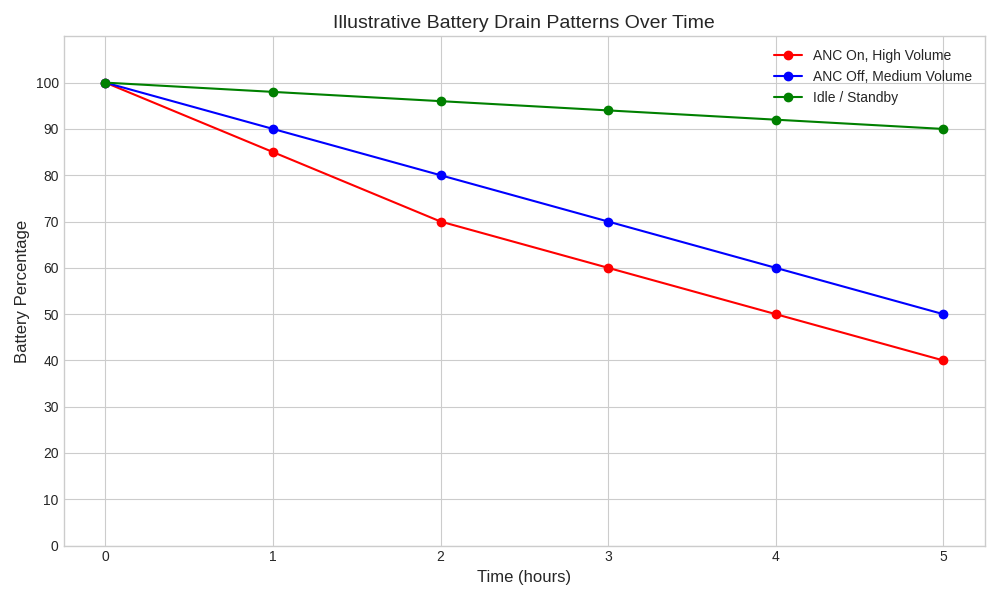
User-reported battery drain trends show faster depletion with ANC enabled and high volume, moderate depletion with normal usage, and minimal drain during idle periods. Patterns often stabilize after the first 2–3 hours of continuous use.
Section 5 — FAQ: Headphone Battery Drain
Why do battery drain rates vary between users?
Differences in feature usage, Bluetooth stability, volume levels, and environmental conditions influence reported drain patterns.
Do software updates affect battery drain?
Public support resources indicate firmware can alter battery reporting behavior, though results vary across devices.
Does rapid drain indicate a defective battery?
Reports suggest that even properly functioning devices can exhibit faster-than-expected depletion, without indicating hardware failure.
Section 6 — Conclusion
Headphone battery drain trends are widely reported across headphones and earbuds. Patterns such as feature usage, device age, and environmental factors explain much of the variation. Recognizing structural battery behavior helps readers interpret their device performance realistically, without implying defect or requiring a fix.
For patterns related to feature-related battery use, see guides covering ANC limitations and headphone comfort and fatigue.
Reference
Sony Support — Battery life and ANC usage patterns
https://www.sony.com/electronics/support/articles/00248807
RTINGS — Wireless Headphones Battery Life Testing
https://www.rtings.com/headphones/reviews/battery-life
Head-Fi Forum — User-reported wireless headphone battery drain trends
https://www.head-fi.org/threads/wireless-headphones-battery-life